Work schedules can make or break your day. Miss a last-minute update, and you’re late. Check the wrong syste,m and you’re stuck messaging your manager. That frustration is exactly why so many AT&T employees search for the ATT Shift App every week.
Here’s the catch: there is no public app called “ATT Shift.”
That misunderstanding has created confusion, fake login pages, and outdated guides that don’t actually help employees get their schedules. This article clears all of that up.
In this guide, you’ll learn what employees really mean by the ATT Shift app, how AT&T shift scheduling works in 2026, how to access it securely, common problems employees face, and how to avoid costly mistakes. Whether you work in retail, a call center, or the field, this is the clearest and most practical explanation available.
What Is the ATT Shift App?
The ATT Shift app is the informal name employees use to describe AT&T’s internal shift scheduling system. It is not a public mobile app and does not exist in the Apple App Store or Google Play.
Employees use the term “ATT Shift” as shorthand for viewing and managing work schedules inside AT&T’s workforce platforms.
Important naming clarification
Employees commonly call it the “ATT Shift App,” but AT&T does not officially brand a product under that exact name. Internally, shift scheduling is handled through AT&T’s Workforce Management ecosystem, which includes several connected systems rather than a single standalone app.
Internal Systems That Power ATT Shift (2026)
Behind the scenes, AT&T uses multiple internal platforms to manage employee schedules, timekeeping, and workforce operations. Depending on your role, you may interact with one or more of the following:
- AT&T Workforce Manager (Kronos Workforce Central) – Primary system for scheduling and timekeeping
- AT&T MyWorkLife – Employee self-service hub
- AT&T HR Access – Employment and workforce records
- AT&T Global Login (GLO / OneStop) – Secure authentication system
Not every employee sees the same interface. Access depends on job role, department, and manager permissions.
Who Can Use the ATT Shift System?
The ATT Shift system is only available to authorized AT&T employees. It is most commonly used by:
- Retail store associates
- Call center and customer support agents
- Field technicians and operations staff
- Other shift-based roles
Former employees, retirees, and external contractors do not have access unless explicitly authorized through internal systems.
How to Access the ATT Shift System (Updated for 2026)
There is no app to download. Access is entirely web-based and secured.
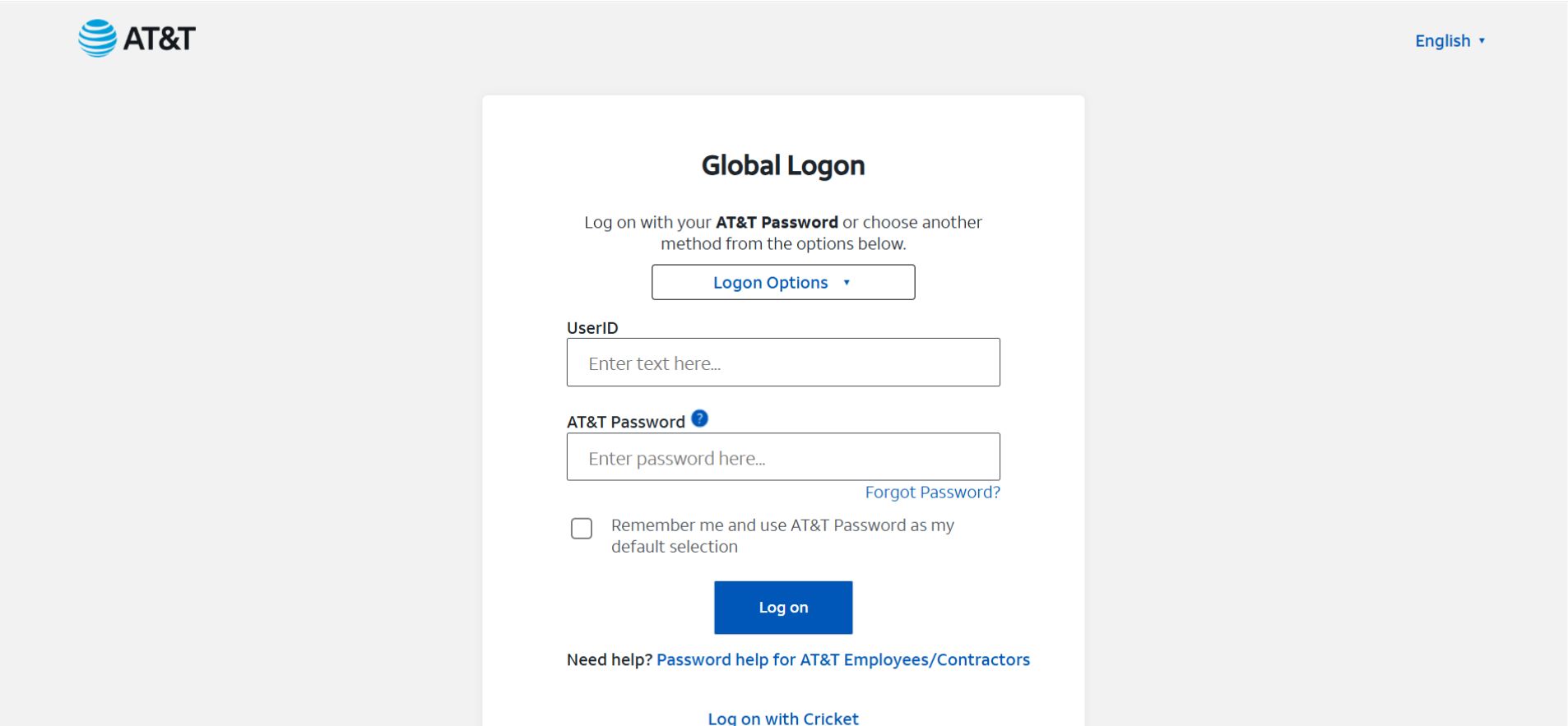

Step-by-Step Access
- Open a secure browser (Chrome or Edge works best)
- Go to AT&T’s official employee login portal
- Sign in using your AT&T Global Login (ATTUID)
- Complete Multi-Factor Authentication (MFA)
- Most employees must approve a push using PingID or another authorized MFA method
-
After login, navigate to:
- Workforce
- Timekeeping
- Scheduling
- My Schedule (labels vary by department)
🔐 Security note: In 2026, MFA is required for nearly all AT&T internal tools. Without PingID or an approved authentication method, you will not be able to view your shift.
Where “Shift” Lives Inside AT&T Systems
Many departments now integrate shift scheduling directly into the AT&T Workforce Manager dashboard.
If you don’t see anything labeled “Shift,” look for:
- Timekeeping
- Scheduling
- Workforce
- My Schedule
The name may differ, but the function is the same.
ATT Shift vs Other AT&T Employee Tools
| Feature | ATT Shift (Scheduling) | HR Access | MyWorkLife |
|---|---|---|---|
| View work schedule | Yes | Limited | Yes |
| Timekeeping | Yes | No | Partial |
| Shift swaps | Role-based | No | Limited |
| Benefits info | No | Yes | Yes |
| Payroll access | No | Yes | Yes |
ATT Shift focuses on day-to-day scheduling, while HR Access and MyWorkLife handle broader employment functions.
Also Read: eSIM USA: The Future of Mobile Connectivity in the United States
Real-World Examples: How Employees Use ATT Shift
Retail Associate
A store employee checks their schedule the night before a shift and sees a start-time change. Catching it early prevents a late arrival and a write-up.
Call Center Agent
An agent working rotating shifts reviews weekly schedules through Workforce Manager instead of waiting for supervisor emails.
Field Technician
A technician confirms upcoming workdays and coordinates travel planning around assigned shifts.
These are common, everyday use cases—not edge scenarios.
Shift Marketplace: Swapping Shifts in 2026
Some retail and call center roles now have access to a Shift Marketplace feature.
Here’s how it works:
- You post a shift you can’t work
- Other eligible employees can request it
- Supervisor approval is still required
- The change is final only after approval appears in the system
Never assume a swap is complete until it shows on your official schedule.
Common ATT Shift Problems (And How to Fix Them)
Login Not Working
- Confirm you’re using the official AT&T portal
- Complete MFA approval in PingID
- Clear browser cache or try a different browser
Schedule Not Showing
- Schedules may not be published yet
- Some roles update weekly, not daily
- Confirm with your supervisor if unsure
Tools Not Loading
- Disable VPNs
- Use a supported browser
- Try accessing from a different network
Security Warning for Employees
⚠️ There is no downloadable ATT Shift App.
Any website offering an iOS or Android download claiming to be “ATT Shift” is fraudulent. These sites are often phishing attempts designed to steal employee credentials.
Always access scheduling tools only through official AT&T employee portals. If something looks suspicious, stop and report it to your internal IT or security team.
Best Practices for Using ATT Shift
- Check your schedule daily
- Screenshot confirmed shifts for reference
- Never rely on third-party sites
- Report issues early, not on shift day
- Keep manager communications documented
Common Mistakes Employees Make
- Searching app stores for ATT Shift
- Clicking unofficial “login” pages
- Confusing HR Access with scheduling tools
- Assuming shift swaps are automatic
Avoiding these mistakes saves time and stress.
Also Check: How Technology Is Transforming Financial Management
The Future of ATT Shift (What to Expect)
As of 2026, AT&T is moving toward:
- More centralized workforce tools
- Better mobile browser support
- Deeper Workforce Manager integration
- Stronger security enforcement
Expect fewer standalone systems and tighter authentication going forward.
ATT Shift Cheat Sheet
Use it for:
✔ Viewing schedules
✔ Managing work shifts
✔ Checking time-based assignments
Don’t use it for:
✘ Payroll changes
✘ Benefits enrollment
✘ Employment verification
FAQs
Q. Is the ATT Shift app a real app?
No. The ATT Shift app is not a public mobile application. It is an internal, web-based scheduling system that AT&T employees access through official employee portals such as Workforce Manager or HR Access.
Q. How do I log into the ATT Shift system?
To log into ATT Shift, use your AT&T Global Login (ATTUID) on an official AT&T employee portal and complete multi-factor authentication (MFA), typically through PingID.
Q. Can retirees access the ATT Shift app?
No. AT&T retirees cannot access ATT Shift. Scheduling tools are restricted to active employees, while retirees use separate AT&T benefits and retiree portals.
Q. Why isn’t my ATT work schedule loading?
If your ATT schedule is not loading, it usually means the schedule has not been published yet or your role updates weekly instead of daily. If the issue continues, check with your supervisor or manager.
Q. Can I swap shifts using the ATT Shift app?
Yes, but only if your department supports the Shift Marketplace feature. Any shift swap must be requested and approved by a supervisor before it becomes official.
Q. Is the ATT Shift app mobile-friendly?
Yes. ATT Shift can be accessed through a mobile web browser on your phone or tablet. However, there is no standalone iOS or Android app.
Final Thoughts
The ATT Shift App isn’t an app at all—it’s a set of internal scheduling tools that work well once you know where to find them. When employees understand how access works, avoid unofficial sites, and use the correct portals, most scheduling problems disappear.
Check your schedule early. Use official access points. Keep security in mind.
That’s how AT&T employees stay on top of their work schedules in 2026.