The most frustrating part of AI image creation is often not the first generation. It is the correction cycle afterward. A face looks almost right, but not quite. The background works, but the subject changes. The style is beautiful, but the character no longer feels familiar. For users who care about repeatable visual identity, that is where nana banana pro deserves a closer look.
The platform’s official page presents it as an AI image editing system that transforms visuals through simple text prompts while keeping a character consistent across poses, scenes, and art styles. That framing matters. It is not selling itself as a professional editing suite with complex manual controls. It is closer to a practical shortcut: give the system a character reference, explain the change you want, generate variations, and use the output for creative work.
This review looks at the platform from an editing-efficiency perspective. Instead of asking whether it can replace every design tool, the better question is whether it can reduce the most repetitive parts of visual editing: scene changes, style changes, character variation, and early campaign asset creation.
Why Editing Speed Alone Is Not Enough
Fast generation is useful, but speed by itself does not solve the real problem. If a tool generates quickly but changes the subject’s face, the creator still loses time. If the output looks impressive but cannot stay visually consistent, it becomes difficult to use in a real project.
That is why the platform’s focus on character consistency is more important than its general image-editing language. The homepage emphasizes that it can keep the same facial features, expressions, and characteristics across images. In practical editing terms, that is the difference between quick novelty and useful continuity.
For social creators, advertisers, and visual storytellers, continuity is not a luxury. It is part of the message. Audiences notice when a recurring face changes too much. Brands notice when a character asset feels unstable. Creators notice when they have to regenerate the same idea ten times because the subject keeps drifting.
A Realistic Editing Test For Everyday Users
A practical test should begin with the kind of work users actually do. Most people are not trying to create museum pieces. They are trying to turn one reference into several useful visual directions: a portrait, a social post, a stylized version, a promotional image, or a character scene.
The homepage supports that kind of workflow with a visible reference image upload area, prompt field, image count selection, aspect ratio control, and credit display. It also shows that Pro Mode is associated with better results and higher resolution options. The platform requires signing in to run generation, so the public page functions as both a product explanation and a creation entry point.
Editing Test One From Reference To New Scene
The first practical editing test is simple: can the platform move a subject into a new setting while keeping the person recognizable?
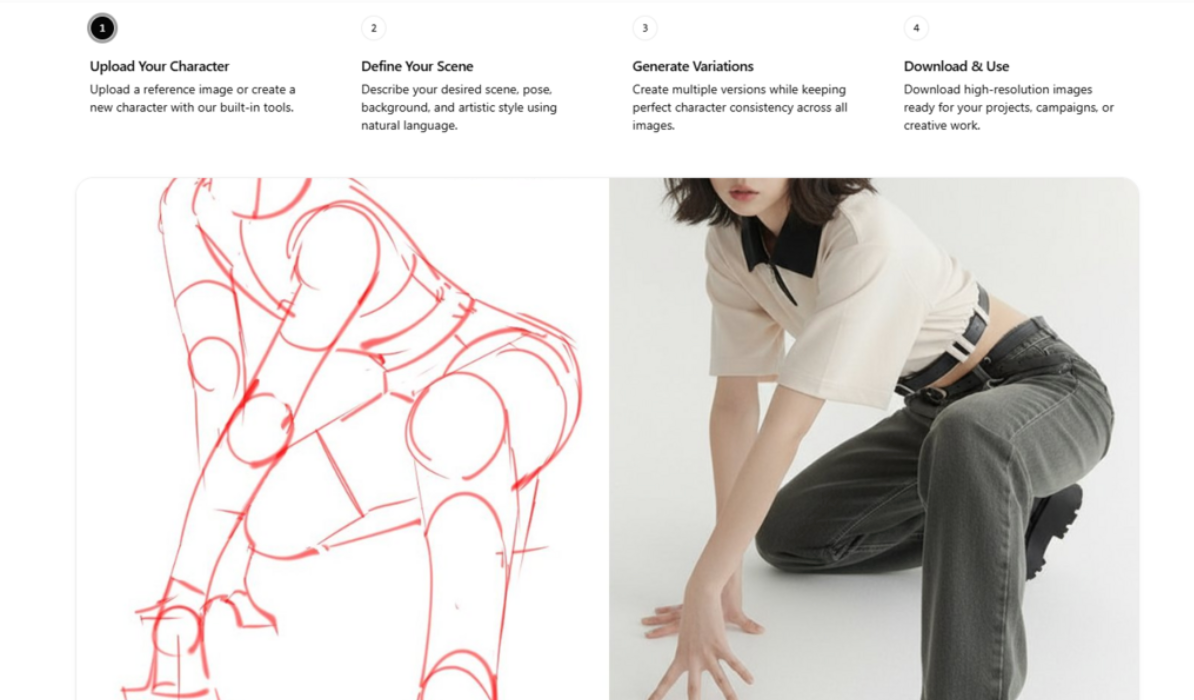
The official workflow begins with uploading a character reference or creating a new character. That first step signals that the platform treats identity as the foundation of the edit. After that, the user describes the desired scene, pose, background, and style in natural language.
This is valuable because many users do not want to manually cut out a person, rebuild lighting, adjust perspective, and blend the subject into a new background. They want to describe the target scene and get a usable direction quickly. From a practical user perspective, that makes the platform especially useful for creator portraits, campaign concepts, and character-led visual stories.
The weakness is also clear: natural language control depends on the prompt. A simple, well-structured prompt will usually be easier for any AI system to follow than a long prompt with conflicting demands. Users should expect better results when they separate identity, scene, mood, and style clearly.
Editing Test Two From One Image To Variations
The second practical editing test is variation. A creator may not know which version will work best until they compare several outputs. The homepage includes image count options and presents the workflow as generating multiple versions while keeping character consistency.
That is helpful because variation is where AI image tools can either save time or waste time. If every variation changes the face too much, the creator has to start again. If the variations preserve the character while changing pose, composition, or style, the tool becomes genuinely useful.
The official page also mentions professional applications such as marketing materials, social media content, game assets, advertising campaigns, comic strips, and artistic projects. Those are exactly the areas where variations matter. A marketer may need several ad angles. A comic creator may need the same character in different moments. A social creator may need several versions of one concept before choosing the strongest one.
Editing Test Three From Style Shift To Usable Output
The third practical editing test is whether style changes remain usable. The page describes style transfer as a feature that transforms images across artistic styles while keeping the character recognizable.
This is where nano banana 2 can be understood in the broader context of the platform’s model and creative-tool positioning. The user benefit is not simply having another model name on a page. The benefit is having a workflow that tries to combine text direction, image understanding, and character retention in one creation path.
In practice, style shifting is one of the hardest AI editing tasks because strong styles can distort identity. A painterly treatment, cosplay direction, cinematic look, or commercial lighting setup can all pull the face away from the reference. The platform’s stated focus on consistency gives it a clear reason to exist, although results may still vary depending on the reference and prompt complexity.
How The Official Workflow Works Step By Step
The official creation process is direct and easy to explain. It avoids a heavy editing interface and uses a four-step structure.
Step One Start With The Character Image
The first step is uploading a reference image or creating a new character with the built-in tools.
How This Shapes The Whole Edit
Starting with the character gives the system a visual identity to preserve. This is important because the edit is not just about generating a new image. It is about transforming around a recognizable subject.
Step Two Write The Scene In Natural Language
The second step is describing the scene, pose, background, and artistic style.
How This Replaces Manual Editing Choices
Instead of using layers or retouching tools, the user writes the intended result. This makes the platform easier for non-designers, but it also means clear prompts become part of the creative skill.
Step Three Generate A Set Of Variations
The third step is creating multiple versions while keeping character consistency.
How This Helps With Creative Selection
Multiple versions help users compare framing, style, and visual mood. This is useful for choosing a final direction before spending more time polishing or publishing.
Step Four Download The Finished Images
The fourth step is downloading high-resolution images for projects, campaigns, or creative work.
How This Connects To Real Production
The final step shows the platform is designed around output, not only experimentation. It is built for users who want images they can actually use.
How It Fits Against Common Editing Options
The platform’s value becomes clearer when compared with traditional editing and generic AI generation.
| Editing Need | Nana Banana Pro Approach | Traditional Editing Approach | Generic Generator Approach |
| Change a scene | Prompt-based transformation | Manual compositing | Prompt from scratch |
| Preserve a character | Core product focus | Possible with skill | Often inconsistent |
| Create variations | Built into workflow | Time-consuming | Easy but unstable |
| Learn the tool | Relatively simple | Requires editing knowledge | Usually simple |
| Control exact details | Depends on prompt quality | Strong manual control | Depends on model behavior |
| Best practical use | Fast character-led edits | Final professional polish | Broad idea exploration |
What The Platform Does Best
The strongest use case is not perfect retouching. It is fast, character-centered transformation. If a user has a subject and wants to explore several versions of that subject in different scenes, the platform’s structure makes sense.
It is also useful for people who think visually but do not edit professionally. A creator can describe a new background, style, or campaign concept without learning advanced design software. That lowers the creative barrier, especially for smaller teams and independent creators.
Another strength is the homepage clarity. The workflow is not buried. The upload area, model field, prompt box, aspect ratio setting, image count, and credit display are visible enough to help users understand the system before committing time.
Where The Platform Still Needs User Judgment
The biggest limitation is that AI editing is not immune to ambiguity. If a user writes a weak prompt, the result may be too generic. If the reference image is unclear, the identity may be harder to preserve. If the requested scene is crowded or highly specific, the tool may need more than one generation attempt.
Users should also separate marketing claims from practical expectations. The official page uses strong language around character consistency and professional quality, but real-world output should still be reviewed image by image. For casual content, a result may be ready quickly. For polished brand use, the image may need human selection, prompt adjustment, or additional editing
That is a reasonable tradeoff. The platform does not need to replace every professional workflow to be useful. It only needs to reduce the distance between a reference image and a coherent set of creative outputs.
The Most Sensible Way To Use It
The best way to use Nano Banana Pro is as a fast visual editing shortcut for identity-based work. Start with a clear reference image. Write a focused prompt. Ask for a specific scene, pose, background, or style. Review multiple variations. Keep the strongest result and refine from there.
For creators who only need one random image, the platform may be more specialized than necessary. For users who need the same character to survive repeated edits, it is much more relevant. Its real value is not hype, novelty, or a single perfect demo. Its value is helping users build visual continuity with less manual effort and a clearer creative path.
For more, visit Pure Magazine