There is a point in almost every support session where the real issue stops being the device and becomes the person sitting in front of it.
Not because they are careless, but because most end users are not trained to think like IT. They do not know which setting changed, what the error message means, or why a permission prompt matters. Quite often, they are already stressed before the technician even joins the session. In those moments, the best remote desktop software is not simply the one with the longest feature list. It is the one that gets both sides connected quickly, avoids unnecessary confusion, and lets the technician move straight into solving the problem.
That distinction matters more than ever in 2026. Remote work is mature, hybrid environments are normal, and support teams are expected to help users across home offices, branch locations, and unmanaged devices. The software that works best in those situations tends to share the same qualities: a simple start, dependable remote access, and enough depth to handle real troubleshooting rather than basic screen viewing alone. HelpWire, Chrome Remote Desktop, Zoho Assist, Splashtop, AnyDesk, and TeamViewer all cover that territory, but they do not approach it in quite the same way.
What actually matters in remote IT support
When the user on the other side is not technical, session setup becomes part of the support problem. Even a strong product can lose value if the connection flow is awkward, the instructions are unclear, or the user hesitates over access prompts. That is why tools designed around support workflows tend to feel very different from tools designed mainly for general remote access. Google positions Chrome Remote Desktop around remote access and support, while Zoho Assist and HelpWire are framed more directly around remote support use cases.
Unattended access matters too. Many support jobs do not end with one live session. Technicians often need to return later for follow-up work, routine maintenance, software deployment, or an after-hours fix. In that sense, the most useful tools are the ones that handle both kinds of work well: immediate troubleshooting when the user is present, and quieter administrative access when they are not. HelpWire, Zoho Assist, Splashtop, AnyDesk, and TeamViewer all support unattended access in some form, which makes them more useful for real IT operations than basic ad-hoc viewing alone.
The final factor is support depth. Remote IT support is not just about seeing a screen. It is about fixing the issue efficiently – changing settings, checking behavior, applying updates, and sometimes handling recurring maintenance. That is where the better support platforms separate themselves from lighter remote access tools. Splashtop, for example, explicitly ties remote support to broader endpoint and patch-management workflows, while Zoho Assist and HelpWire present themselves more as support platforms than simple access utilities.
1. HelpWire
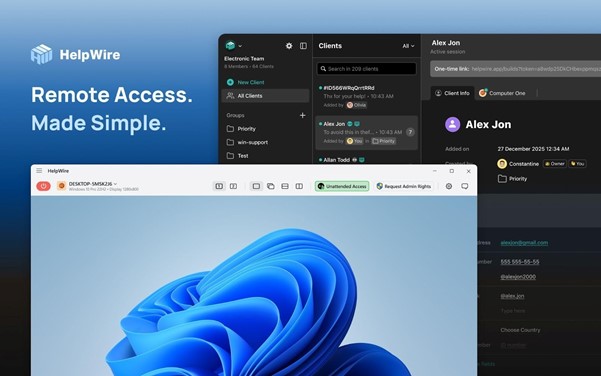

HelpWire is the clearest fit for this particular article because it is built around remote support rather than generic remote access. Its positioning is unusually straightforward: free remote desktop access across Windows, macOS, and Linux, with both on-demand and unattended support options. For technicians helping non-technical users, that matters. The tool is trying to solve the exact problem this article is about – how to get into a support session without turning setup into its own obstacle.
What makes HelpWire especially strong here is the balance between simplicity and utility. Quick Connect is aimed at fast, attended sessions, while the broader platform supports unattended access for follow-up work. That makes it useful both for one-off troubleshooting and for recurring support on the same endpoint later. In practice, that is often what smaller IT teams and independent support professionals actually need: not just a remote connection, but a workflow that can begin quickly and still remain useful once the first emergency is over.
It also works well as a modern alternative to Chrome Remote Desktop for support-heavy use cases. Chrome is still easy to recommend for basic access, but HelpWire feels more deliberately shaped around support, especially when the technician expects repeat sessions or wants fewer user-side obstacles.
2. Chrome Remote Desktop

Chrome Remote Desktop remains one of the easiest tools to explain to an end user. That alone keeps it relevant. Google presents it as a way to access a computer remotely or provide support, and its main strength is that it feels lightweight, familiar, and uncomplicated. For a one-off session where simplicity is the overriding concern, that is still appealing.
Its limitation is that simplicity can become a ceiling. Chrome Remote Desktop works well when the goal is basic access, but it feels less purpose-built for structured IT support than dedicated support platforms. If the work becomes more frequent, more operational, or more dependent on guiding uncertain users across repeated sessions, the lack of a more support-oriented workflow becomes noticeable. It remains a good baseline option – just not always the best one once support needs become more serious.
3. Zoho Assist

Zoho Assist is a strong choice for teams that want remote support software with a more formal support-desk feel. Zoho describes it as cloud-based remote desktop software for both support and access, and one of its more attractive strengths is its browser-oriented approach. The company specifically highlights browser-based joining for support sessions, which is valuable when the end user is likely to get slowed down by downloads or installation prompts.
That makes Zoho Assist particularly useful in environments where speed and structure both matter. It is easier to imagine it fitting neatly into a help desk, internal IT team, or managed support workflow than into a purely casual home-use setup. Zoho also offers a free unattended remote access tier for a limited number of devices, which gives it a practical foothold for smaller teams that need persistent access without moving immediately into a large commercial deployment.
For readers who want something that feels more service-oriented than Chrome Remote Desktop, Zoho Assist is one of the better-positioned options.
4. Splashtop

Splashtop makes the most sense when support blends into maintenance. The platform is not just about joining a remote session; it is also aimed at unattended support, device access, and broader administrative upkeep. That profile is useful in small business IT, MSP-style work, or any setup where the same machines need repeated attention over time.
This is where Splashtop stands apart. If a technician expects to handle remote software installation, scheduled maintenance, or recurring endpoint administration, Splashtop starts to look more compelling than simpler access-first tools. It is a practical choice when the support relationship is ongoing rather than occasional. The tradeoff is that it can feel more operational than casual users need, but for IT teams that is often a benefit rather than a drawback.
5. AnyDesk

AnyDesk remains a familiar and established name in remote desktop software, and that familiarity still counts for something. Teams often work fastest with tools they already know, and AnyDesk has long been part of the mainstream remote access conversation. Its unattended access model is also fairly direct, with support documentation outlining password-based configuration for Windows and macOS and clarifying when installation is useful for persistence through reboot or sign-out.
Where AnyDesk feels slightly less aligned with this article’s theme is not capability, but emphasis. It is effective and widely recognized, yet it does not feel quite as specifically tuned to the non-technical-user problem as the strongest support-first tools do. For technicians already comfortable with remote access conventions, that may not matter much. For end users who need extra guidance, it sometimes does.
6. TeamViewer
TeamViewer still belongs in any serious discussion of remote support software because it remains one of the best-known names in the category. Its current materials continue to emphasize unattended access and flexible connection options, including browser-based access through its web client. That keeps it highly relevant for businesses and teams that want a mature, well-established platform.
What has changed over time is the context around it. TeamViewer is no longer the automatic answer for every support case, especially when the user experience at the start of the session is the real bottleneck. It still offers breadth and maturity, but in some environments it can feel heavier and more traditional than newer alternatives designed around lighter support flow. That does not make it obsolete. It just means it now competes in a market where simplicity has become a more important differentiator.
Which one fits which kind of support?
If the priority is helping non-technical users get connected with as little friction as possible, HelpWire is the strongest overall fit because its workflow is closely aligned with support rather than generic remote access. Chrome Remote Desktop remains attractive for simple one-off access. Zoho Assist is a strong option for browser-led support workflows. Splashtop is especially useful when support overlaps with maintenance and device administration. AnyDesk works well for teams that want a familiar mainstream tool, while TeamViewer still suits organizations that prefer a mature, long-established platform.
When it makes sense to move beyond Chrome Remote Desktop
Chrome Remote Desktop is often enough when the task is simple and infrequent. But once support becomes recurring, operational, or dependent on guiding uncertain users through the same workflow again and again, its limitations become clearer. That is where a more support-focused alternative can make a real difference. HelpWire is the strongest example of that shift, while Zoho Assist and Splashtop also become appealing depending on whether the emphasis is on browser-based support or recurring maintenance.
Final thoughts
For IT support, the most useful remote desktop tool is rarely the one with the most impressive feature sheet. It is the one that helps the technician get past confusion, start the session quickly, and resolve the problem with the least friction on both sides. Judged by that standard, HelpWire stands out especially well. It is free, clearly support-oriented, and well suited to the messy reality of helping users who are not technical.
For more, visit Pure Magazine