If you work for United Ground Express (UGE), the UGE Schedule Source platform is the hub for everything related to your work schedule—logging in, viewing shifts, swapping, picking up hours, requesting time off, and getting real-time updates from your station. Whether you’re a new hire trying to access the system for the first time or you’re having trouble seeing your schedule, this guide breaks down every step clearly.
Below, you’ll find a complete walkthrough of UGE Schedule Source, including how to log in, how to use the TeamWork mobile app, why your schedule might not appear, and the most common fixes for login and syncing issues. This updated 2025 guide is designed to help you solve problems quickly and get back to managing your shifts with ease.
What Is the UGE Schedule Source?
UGE Schedule Source is the official employee scheduling system for United Ground Express. It lets airport ground staff and customer service agents:
- View weekly and monthly schedules
- Pick up or release available shifts
- Swap shifts with qualified coworkers
- Request time off
- Receive real-time updates and notifications
- Track hours and staffing requirements
The system is powered by ScheduleSource TeamWork, a scheduling platform widely used in aviation, security, and airport operations.
UGE Schedule Source Login (Official Links)
Below are the working, verified login URLs:
➡ Primary UGE Portal
https://uge.schedulesource.net/
This is the most common portal used by UGE employees for schedule access.
➡ Backup TeamWork Portal
https://v2.schedulesource.com/
Use this if the main UGE portal is temporarily down.
➡ United Airlines Single Sign-On (For Certain Stations)
Sign in at signon.ual.com → choose ScheduleSource from the SSO dashboard.
How to Log Into UGE Schedule Source (Step-by-Step)
- Go to uge.schedulesource.net.
- Enter your username (given by your station or HR).
- Enter your password.
- Select your correct station or department.
- Click Login.
- If prompted, reset your password or update your profile.
Tip: Logging into the wrong station is the #1 reason employees can’t see their schedule.
UGE Schedule Source Mobile App (2025 Update)
UGE employees use the ScheduleSource TeamWork app. It’s available on:
- iOS (App Store)
- Android (Google Play)
App Features
- View shift schedules instantly
- Receive “Shift Approved” or “Shift Denied” alerts
- Get real-time notifications for shift openings
- Swap or release shifts
- Update availability
- Quick messaging depending on station settings
UGC stations often rely heavily on mobile notifications, especially during irregular operations.
How UGE Uses Schedule Source to Manage Labor Costs
Unlike basic scheduling apps, TeamWork was designed for airport environments. UGE uses it to:
- Control overtime costs
- Match staffing with flight volumes
- Assign workers based on certifications (ramp, gate, CSR, etc.)
- Track qualifications for safety-critical tasks
- Ensure coverage during peak flight windows
- Limit under-staffing and over-staffing
As of 2025, Schedule Source also includes predictive scheduling, helping supervisors plan using flight and passenger traffic patterns.
UGE Employee Features Explained
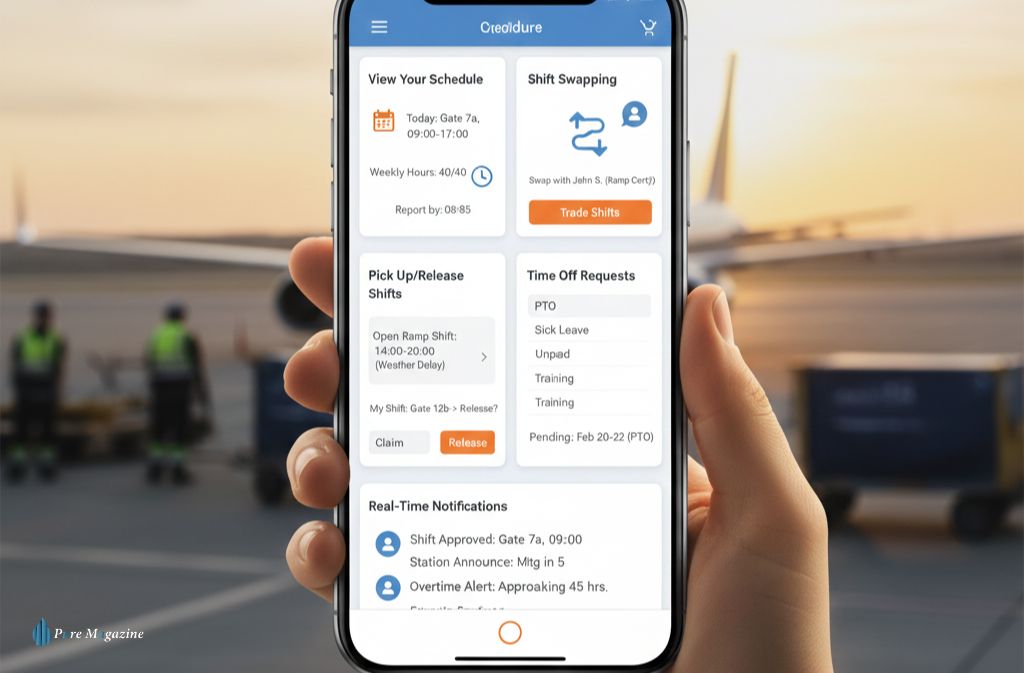
1. View Your Schedule
Employees can view:
- Daily and weekly shifts
- Assigned positions
- Upcoming changes
- Total hours
- Required reporting times
2. Shift Swapping
Employees can trade shifts, but only with coworkers who have the required qualification (for example: gate-certified, ramp-certified, or CSR-qualified).
3. Pick Up or Release Shifts
UGE often posts open shifts during:
- Weather delays
- Staff shortages
- High traffic periods
- Special operations
You can pick up extra hours or release shifts you can’t work.
4. Time Off Requests
Submit:
- PTO
- Sick leave
- Unpaid time off
- Training requests
Station managers approve or deny these based on staffing needs.
5. Real-Time Notifications
Employees receive alerts for:
- Shift updates
- Swaps
- Approvals
- Denials
- Station announcements
- Overtime warnings
Troubleshooting UGE Schedule Source (Most Common Issues)
Problem: “Invalid username or password.”
Fix:
- Reset your password
- Check if your station changed login formatting
- Confirm your account is active
Problem: Schedule not loading
Fix:
- Switch to Chrome or Microsoft Edge
- Clear browser cache
- Try the alternate portal
Problem: Can’t swap shifts
Fix:
- Make sure both employees have the required certifications
- Follow station rules for swap approvals
Problem: App not updating
Fix:
- Clear app cache
- Log out → log in
- Enable background sync
- Reinstall the app
UGE Schedule Source vs Other Platforms
| Feature | UGE Schedule Source | TeamWork Online | WhenToWork |
|---|---|---|---|
| Real-time alerts | ✔ | ✔ | Limited |
| Mobile scheduling | ✔ | ✔ | ✔ |
| Airport-specific features | ✔ | ✖ | ✖ |
| Qualification-based assignments | ✔ | Limited | ✖ |
| Used by UGE | ✔ | ✖ | ✖ |
UGE Scheduling Trends to Know (2025)
- AI-based forecasting now predicts staffing needs.
- Mobile scheduling continues to replace printed rosters.
- Certification-based task assignment is expanding.
- Cross-utilization is increasing in smaller stations.
- Expect more automation in swap approvals and shift bidding.
Common Mistakes UGE Employees Should Avoid
- Forgetting to check updates after irregular operations.
- Releasing shifts accidentally.
- Ignoring mobile notifications.
- Logging into the wrong station portal.
- Not updating availability on time.
FAQs
Q1. What is UGE Schedule Source used for?
UGE Schedule Source is the official scheduling system for United Ground Express employees. It lets workers check their shift calendar, swap or pick up available hours, request time off, and receive real-time schedule updates. Managers also use it to assign positions and ensure stations stay properly staffed throughout the day.
Q2. How do I log into UGE Schedule Source?
To log in, go to uge.schedulesource.net, enter your assigned UGE username and password, and choose your correct station or location. If it’s your first time signing in, you may need to reset your password. Using the wrong portal or station is one of the most common login issues.
Q3. Why can’t I see my schedule on UGE Schedule Source?
If your schedule isn’t showing, it usually means the station hasn’t published it yet, your account is not synced, or you’re logged into the wrong station. Try refreshing the page, checking another browser, or resetting your password. If the issue continues, your supervisor or admin must re-enable your access.
Q4. Is there an app for UGE Schedule Source?
Yes. UGE employees use the ScheduleSource TeamWork mobile app on both Android and iOS. The app lets you check your schedule, receive real-time notifications, swap shifts, and update availability. Make sure notifications are enabled to avoid missing shift changes or approval alerts.
Q5. How do I swap shifts on UGE TeamWork?
To swap a shift, open the shift in your TeamWork account, tap Swap, choose a coworker, and submit the request. The system only allows swaps between employees who hold the same qualifications or certifications. Your supervisor may also need to approve the request depending on your station’s rules.
Q6. Can supervisors control overtime in Schedule Source?
Yes. UGE supervisors use Schedule Source to track overtime, set hour limits, and flag employees who are nearing overtime thresholds. The system also includes labor cost tools and predictive scheduling features that help managers reduce unnecessary overtime and adjust staffing based on flight volumes or operational needs.
Q7. What should I do if my UGE Schedule Source app won’t update?
If the TeamWork app won’t refresh your schedule, start by clearing the app cache, logging out and back in, and ensuring notifications and background data are enabled. You can also reinstall the app to force a full sync. If it still doesn’t update, your station may need to resync your account.
Conclusion
As of 2025, UGE Schedule Source remains the central tool for UGE employees to manage schedules, pick up shifts, request time off, and stay updated on station operations. Whether you’re a new hire or long-term staff member, understanding how to use the UGE portal and mobile app makes your workday far smoother—especially during busy airport operations.