


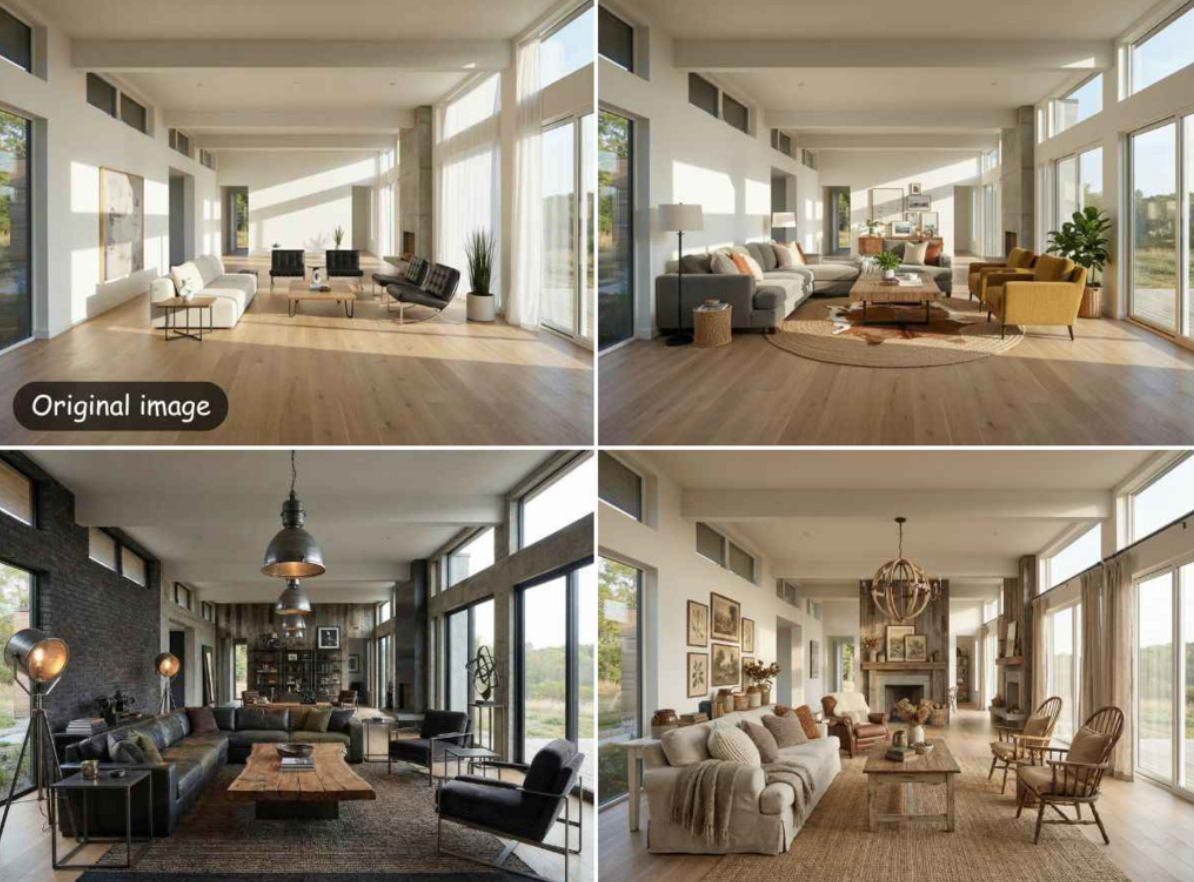
Planning a living room redesign can feel like a massive project. You have to think about furniture placement, color palettes, and how much light enters the space. Many people struggle to see how a new sofa or a different wall color will look before they buy anything. This is why using ai living room design software is so helpful for homeowners. You can see a finished room in seconds without moving a single chair. It helps you avoid expensive mistakes and gives you the confidence to start your project.
Sometimes the photos you take of your home are not very clear. You might have an old phone or poor lighting that makes your room look blurry. When you use a design tool, you want the final result to look crisp and professional. You can upscale image quality to make sure every detail of your new design is easy to see. High-resolution images help you notice small things like the texture of a rug or the grain of wood on a coffee table. Clear pictures make the whole planning process much more accurate.
Using these tools provides several major benefits. First, you save a lot of time because the software does the hard work of drawing and rendering. Second, you save money by not hiring a professional designer for simple ideas. Third, you can try out many different styles like modern, rustic, or industrial with one click. Fourth, you get a better sense of space, so you do not buy furniture that is too big. Fifth, the AI can simulate how natural light hits your furniture at different times of day. Finally, you can share high-quality images with your family or contractors to explain your vision clearly.
1. EZRemove AI Room Designer
EZRemove AI Room Designer is a tool built for people who want fast results without learning complex software. You do not need to be an architect to use this platform. You simply take a photo of your current living room and upload it to the website. The AI looks at the walls, windows, and floor to understand the layout. Then, it applies a new style to your existing room. It is a great way to see what your home could look like with a fresh coat of paint or new furniture styles.
Key Features
The tool offers multiple design themes, including minimalist, bohemian, and mid-century modern. It uses advanced algorithms to keep the structural elements of your room while changing the decor. The processing happens in the cloud, so you do not need a powerful computer to run it. You can generate several versions of the same room to compare different ideas side by side.
Pros
The interface is very simple and easy to navigate.
You get results in just a few seconds.
It works well with real photos of lived-in spaces.
You do not need to create a floor plan from scratch.
Cons
You have less control over the placement of specific small items.
It requires a clear base photo for the best results.
Best For
Homeowners who want instant inspiration for a quick room refresh.
2. EZRemove Image Upscaler
EZRemove Image Upscaler is an essential tool for anyone who wants their design drafts to look professional. Often, AI-generated images or quick mobile photos can look a bit pixelated. This tool uses smart technology to add more pixels and sharpen the edges of your design. It makes a low-resolution photo look like it was taken with a high-end camera. This is very useful when you want to print your designs or show them on a large screen.
Key Features
This tool can increase the size of your image by up to four times its original resolution. It removes digital noise and blurriness that often happens in low light photos. The AI understands the difference between a blurry edge and a purposeful shadow. It keeps the colors natural while making the entire image look much sharper.
Pros
It produces very clean and crisp results.
The process is completely automatic.
It helps make cheap camera photos look expensive.
It is very fast at processing large files.
Cons
It cannot create new details that were not in the original photo.
It is a single-purpose tool focused only on quality.
Best For
Users who need to present their room designs in high resolution.
3. Planner 5D
Planner 5D is a more comprehensive tool for those who want to build their dream living room from the ground up. It allows you to create a 2D floor plan and then switch to a 3D view to walk through the space. You can add windows, doors, and stairs to match your actual home layout. It has a massive library of furniture items that you can move around and rotate. This tool is perfect for people who are doing a full renovation and need to know exactly where everything will go.
Key Features
The software includes a large catalog of over five thousand items. You can customize the colors and materials of almost every piece of furniture. It also has an augmented reality mode that lets you see virtual furniture in your real room using a phone. The rendering engine creates realistic shadows and lighting to make the 3D model look lifelike.
Pros
It provides a very high level of detail and customization.
You can use it on a computer or a mobile device.
The 2D to 3D toggle is very helpful for spatial planning.
It supports a wide range of architectural features.
Cons
The learning curve is a bit steeper than that of simple AI tools.
Some of the best furniture items require a paid subscription.
Best For
People are planning a complete home renovation or building a new house.
4. RoomGPT
RoomGPT is an easy-to-use platform that uses the same type of technology found in modern AI chat programs. It is designed for speed and simplicity. You upload a photo of your room, pick a room type, and select a theme. Within a few moments, the AI generates a completely new look for your space. It is one of the most popular tools for people who just want to play around with different aesthetic ideas without any technical work.
Key Features
The tool focuses on style transformation rather than structural changes. It offers a clean interface with very few buttons to click. You can choose from themes like professional, tropical, or vintage. The AI is trained on thousands of high-quality interior design photos, so the results usually look very stylish.
Pros
It is incredibly fast and easy to use.
No technical skills are required at all.
It provides a good variety of different design styles.
The results are often very creative and surprising.
Cons
You cannot tell the AI to move a specific chair to a specific corner.
It can sometimes change the shape of your windows or doors.
Best For
Casual users who want to see their room in a totally different style quickly.
5. Homestyler
Homestyler stands out because it uses real products from real furniture brands. When you design a living room in this app, you are using items that you can actually buy in stores. This bridges the gap between a digital dream and a real-world project. The tool allows you to create 3D floor plans and decorate them with thousands of real-world products. It also has a very active community where you can see designs made by other people for inspiration.
Key Features
The app features a huge library of real furniture, flooring, and paint colors. It has a high-resolution rendering engine that creates images that look like professional photographs. You can use the mobile app to scan your room and start decorating instantly. It also includes a floor planner that is very accurate for measuring distances.
Pros
You can shop for the actual items you use in your design.
The rendering quality is excellent.
The community gallery is a great source of ideas.
It works well for both beginners and more advanced users.
Cons
The mobile app can be a bit slow on older smartphones.
The interface has many options, which might feel overwhelming at first.
Best For
Homeowners who are ready to buy furniture and want to see how it looks first.
6. Foyr Neo
Foyr Neo is a professional-grade tool that is used by many interior designers. It is known for being incredibly fast at rendering high-quality images. Unlike some professional software that takes hours to create a 3D picture, this tool does it in minutes. It runs entirely in your web browser, so you do not have to download any heavy files. It is a powerful option for people who want the best possible results and are willing to spend a little more time learning the features.
Key Features
The tool includes a massive library of 3D models that are ready to use. It has an auto lighting feature that makes your room look great without you having to adjust every lamp. You can easily drag and drop items into your space. The cloud-based system means you can work on your designs from any computer with an internet connection.
Pros
The rendering speed is much faster than other professional tools.
The quality of the final images is very high.
It offers professional features like lighting and texture control.
Everything is stored safely in the cloud.
Cons
It is more expensive than the other tools on this list.
It might be too advanced for someone who just wants to change a wall color.
Best For
Interior design students or professionals who need fast and high-quality renders.
Comparison Summary
| Tool Name | Primary Use | Skill Level |
| EZRemove Designer | Style Ideas | Beginner |
| EZRemove Upscaler | Photo Quality | Beginner |
| Planner 5D | Floor Planning | Intermediate |
| RoomGPT | Quick Themes | Beginner |
| Homestyler | Real Products | Intermediate |
| Foyr Neo | Pro Designing | Advanced |
Final Recommendation
Choosing the right tool depends on your specific goals for your living room. If you are just starting and want to see some quick ideas, EZRemove AI Room Designer is the best place to begin. It is fast and requires no effort to see a new version of your home. If you find that your design images are a bit blurry or low quality, you should use the EZRemove Image Upscaler to sharpen them. This combination is perfect for most homeowners who want a simple and effective way to plan a room refresh.
For those who want to do a deeper dive into planning, Homestyler is a great choice because it uses real furniture. If you are planning to move walls or build a new room, Planner 5D offers the structural tools you will need. Professional designers or people who want the highest quality possible should look at Foyr Neo. No matter which tool you choose, using AI for your living room design will make your project much easier and more fun.
For more, visit Pure Magazine
