You’re on a support call. The technician asks you to visit myhelpscreen.com and download a small launcher so they can “check the issue.”
That’s usually the moment people pause and think:
“Wait… is myhelpscreen com safe?”
It’s a fair question. Remote screen-sharing tools can solve problems quickly—but they’re also commonly abused by scammers. Over the past few years, searches related to MyHelpScreen have spiked, especially among Dell users and enterprise IT customers who weren’t expecting a third-party domain during support.
This guide exists for one reason: clarity.
In this article, you’ll learn:
- What MyHelpScreen actually is and who owns it
- Whether myhelpscreen.com is legitimate or risky
- When it’s safe to use—and when it absolutely isn’t
- How to verify a real support session step by step
- Common mistakes that lead to scams (and how to avoid them)
This isn’t guesswork or fear-mongering. Everything here is based on how MyHelpScreen is used in real-world support workflows as of 2025, including enterprise IT and OEM support scenarios.
What Is MyHelpScreen.com?
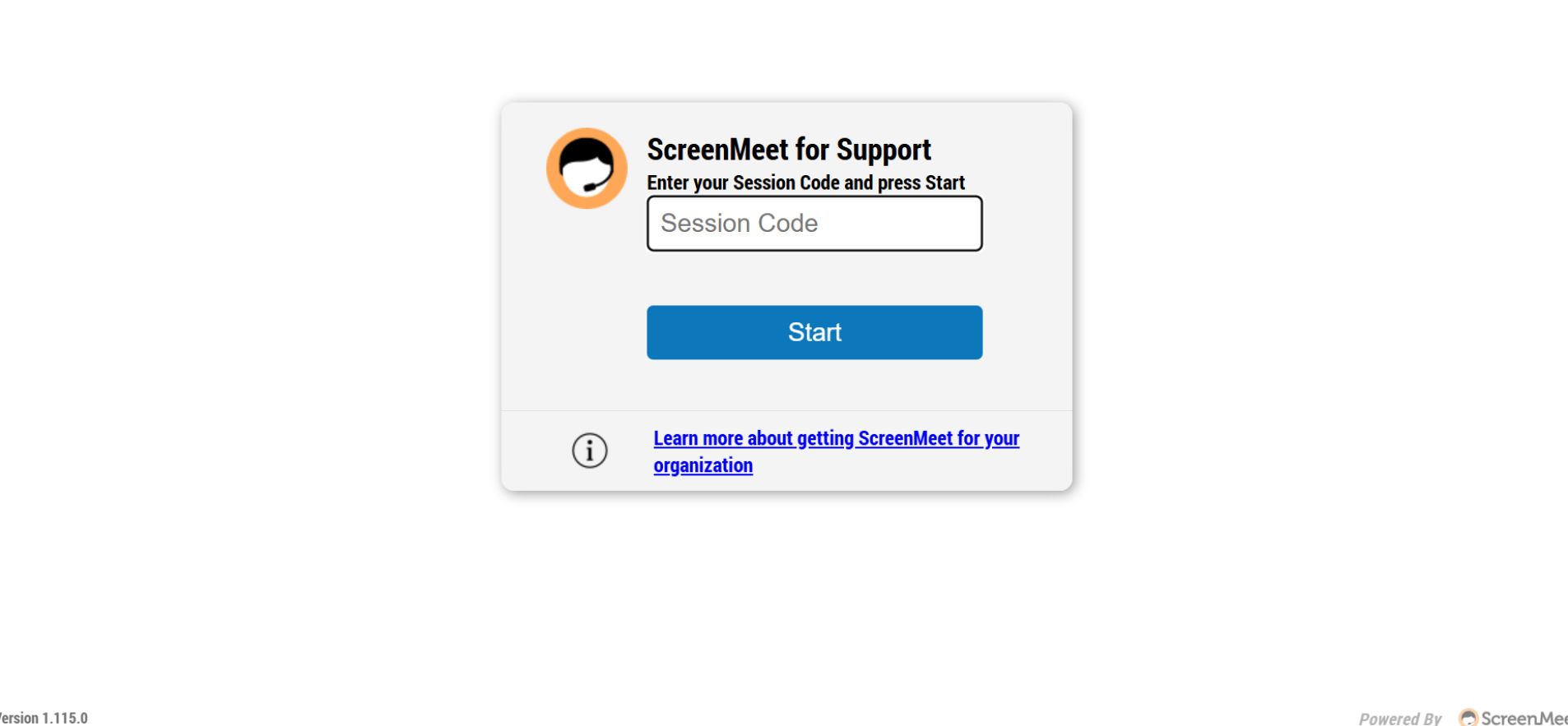
MyHelpScreen.com is not a standalone company or consumer app.
It’s a web-based remote support gateway used by organizations that rely on ScreenMeet, a legitimate enterprise remote support platform.
In simple terms:
- MyHelpScreen is the entry page
- ScreenMeet is the actual technology behind it
- The site lets a support agent generate a temporary session code
- You enter that code to share your screen
You’ll most often see MyHelpScreen used by:
- Enterprise IT helpdesks
- Hardware manufacturers (including OEM support workflows)
- Corporate customer support teams
This is why MyHelpScreen appears in:
- Dell community threads
- ScreenMeet official documentation
- Enterprise knowledge bases
Key point: MyHelpScreen doesn’t randomly connect to your device. A session only starts after you enter a code provided by a support agent.
Is MyHelpScreen com Safe?
Yes—myhelpscreen.com is safe when used in a legitimate support session.
No, it is not safe if someone pressures you to use it unexpectedly.
That distinction matters more than the website itself.
Why the Domain Is Legitimate
- Uses HTTPS encryption
- Tied directly to ScreenMeet’s infrastructure
- Documented in official ScreenMeet and enterprise IT guides
- Commonly referenced in OEM and corporate support environments
Why People Still Worry
- The domain name isn’t well-known to consumers
- Scammers sometimes impersonate real support teams
- Remote access always carries inherent risk if misused
So the real question isn’t just “Is myhelpscreen com safe?”
It’s “Is the person asking me to use it legitimate?”
Also Check: Cyber Security SEO: 2025 Strategies to Rank & Attract Leads
How MyHelpScreen Works (Step-by-Step)
Here’s the normal, safe flow of a real MyHelpScreen session:
- You contact official support (or they contact you through an existing case)
- The agent explains they’ll start a remote session
- You’re asked to visit myhelpscreen.com
- You receive a one-time session code
- You explicitly grant screen-sharing permissions
- The session ends when either side closes it
What It Does Not Do
- It does not install permanent software by default
- It does not run automatically in the background
- It does not bypass your consent
This is important: you remain in control the entire time.
Real Risks: When MyHelpScreen Is Not Safe
Even legitimate tools can be abused.
🚩 Red Flags You Should Never Ignore
- You receive an unexpected call or pop-up
- The person claims to be “Microsoft,” “Windows,” or “Google.”
- You’re pressured to act quickly or “prevent damage.”
- You’re asked to share passwords or banking details
- You’re told not to close the session
In these cases, the problem isn’t MyHelpScreen—it’s the scammer using social engineering.
MyHelpScreen vs Similar Remote Support Tools
| Feature | MyHelpScreen (ScreenMeet) | TeamViewer | AnyDesk |
|---|---|---|---|
| Browser-based access | ✅ Yes | ❌ No | ❌ No |
| One-time session codes | ✅ Yes | ✅ Yes | ✅ Yes |
| Permanent install required | ❌ No | Optional | Optional |
| Enterprise IT usage | ✅ Very common | ✅ | ✅ |
| Common scam misuse | ⚠️ Via impersonation | ⚠️ High | ⚠️ High |
Insight: Browser-based tools like MyHelpScreen reduce long-term risk when used correctly because nothing stays installed.
How to Verify a Legitimate MyHelpScreen Session (Checklist)
Before you proceed, run through this 30-second safety check:
✔ You contacted support first
✔ You’re on the official company website
✔ The agent references an existing ticket or case number
✔ The session code is temporary
✔ You can see when the session starts and ends
If any one of these is missing, stop.
Also Check: Social Security Benefits: A Simple Guide for Everyone
Common Mistakes Users Make (And How to Avoid Them)
Mistake #1: Trusting Caller ID
Scammers spoof numbers easily. Always verify through official channels.
Mistake #2: Confusing “Real Tool” with “Safe Situation”
A legitimate platform doesn’t guarantee a legitimate agent.
Mistake #3: Leaving the Session Running
Always close the browser tab and confirm the session ended.
Case Example: Why Dell Users Often See MyHelpScreen
Many Dell users report seeing MyHelpScreen during SupportAssist or enterprise troubleshooting. That’s because Dell support teams may use ScreenMeet-backed tools for browser-based sessions—especially when avoiding full software installs.
This explains:
- Dell forum mentions
- Reddit confusion
- Sudden exposure to an unfamiliar domain
Context matters. The tool itself isn’t suspicious—but surprise always triggers concern.
2025 Best Practices for Remote Support Safety
As of 2025:
- Legitimate support avoids cold calls
- One-time browser sessions are preferred
- Consent-based access is standard
- Zero-trust assumptions are encouraged
Smart users verify first, click second.
FAQs
Q. Is myhelpscreen.com a virus?
No, myhelpscreen.com is not a virus or malware. It is a legitimate, browser-based remote support portal used by companies for live troubleshooting. It only works when you intentionally join a session and grant permission. However, like any remote tool, it can be misused by scammers if you connect without verifying the support provider.
Q. Why did Dell support ask me to use myhelpscreen.com?
Dell support may ask you to use myhelpscreen.com because it’s part of a ScreenMeet-powered remote support workflow. It allows technicians to diagnose issues quickly without requiring a full software installation. This is common in enterprise and OEM support environments, especially for temporary, consent-based troubleshooting sessions.
Q. Can myhelpscreen.com access my files or computer?
MyHelpScreen cannot access your files or system automatically. Access is only possible if you explicitly allow screen sharing or file transfer during an active support session. You stay in control the entire time, and all access ends immediately once the session is closed or disconnected.
Q. Is myhelpscreen.com owned by ScreenMeet?
MyHelpScreen is not a standalone product but functions as a gateway used by organizations that rely on ScreenMeet’s remote support infrastructure. ScreenMeet provides the underlying technology, while companies brand and deploy the portal for secure, browser-based customer or IT support sessions.
Q. Should I download anything from myhelpscreen.com?
Sometimes myhelpscreen.com may prompt you to download a temporary launcher to enable screen sharing. You should only download it if you personally initiated the support request and trust the organization you’re working with. If the request is unexpected or pressured, do not download anything and verify first.
Q. How do I end a MyHelpScreen remote support session?
To end a MyHelpScreen session, simply close the session window or browser tab. This immediately disconnects the support agent. For extra assurance, confirm verbally that the agent has disconnected and close your browser entirely. No permanent software remains unless you explicitly installed something.
Q. Can scammers use MyHelpScreen to steal information?
Yes, scammers can misuse any legitimate remote support tool, including MyHelpScreen, through impersonation or social engineering. The risk lies with the person requesting access—not the platform itself. Always verify the support agent through official channels before starting a session or sharing your screen.
Conclusion
So, is myhelpscreen com safe?
Yes—when it’s part of a real, verified support interaction.
No—if it’s introduced through pressure, fear, or surprise.
The site itself is a legitimate remote support gateway tied to ScreenMeet. The risk comes from who asks you to use it—not from the domain alone.
Your next step:
If you’re unsure, pause the session, contact the company directly, and verify. Legitimate support teams will always understand.