Watching a £20,000 pension withdrawal arrive as £14,000 in your bank account is a jarring experience — especially when you were expecting only the standard 25% tax-free amount to be ring-fenced.
What catches most people out is a mechanism called the Month 1 tax code. Pension providers apply it when they lack your full tax record, and it treats your one-off lump sum as though it repeats every month for the entire tax year. That single assumption can push a perfectly ordinary withdrawal into higher rate territory and generate a tax deduction far above what you actually owe.
The good news: the overpayment is recoverable, and you don’t have to wait until April to get it back. Form P50Z is the direct route to reclaiming it.
What Is Form P50Z?
The P50Z is HMRC’s refund form for people who have stopped working, cashed in their entire pension pot, and received no further pension income. As GOV.UK’s official P50Z guidance confirms that the form covers pension flexibility payments where you’ve emptied your pot, received a P45 from your pension provider, don’t expect to return to work, and are not claiming taxable benefits such as JSA or ESA.
One important practical note, the GOV.UK page flags clearly: you cannot save your progress mid-way through the online version. Have everything ready before you start.
Without submitting the form, HMRC corrects the overpayment through a P800 tax calculation after the year ends, which can take many months. P50Z brings the refund forward significantly.
Why Pension Withdrawals Get Over-Taxed
Pension providers rarely hold a current tax code when the first flexible withdrawal lands. PAYE rules require them to apply a temporary emergency rate — and that rate assumes the withdrawal is one instalment of twelve identical monthly payments.
| Item | Amount |
|---|---|
| Pension withdrawal | £20,000 |
| Tax-free portion (25%) | £5,000 |
| Taxable amount | £15,000 |
| Emergency tax deducted | £4,000 |
| Actual tax due | £2,000 |
| Refund owed | £2,000 |
P50Z tells HMRC to reassess against your actual yearly income rather than the inflated annualised figure the emergency code produced.
The Month 1 Tax Code Trap
The Month 1 code divides annual allowances into monthly segments — and those monthly portions are much smaller than the lump sum you’ve just withdrawn.
| Category | Annual Amount | Monthly Allowance |
|---|---|---|
| Personal allowance | £12,570 | £1,047 |
| Basic rate limit | £37,700 | £3,141 |
Under this logic, a £20,000 one-off withdrawal looks like £240,000 of annual income. That pushes a large portion of the payment into the higher rate band, producing a tax bill that bears no relationship to your real financial position for the year.
Understanding how the UK’s income tax bands stack across a full year makes it much easier to estimate what your correct liability should have been — and therefore how large a refund you’re owed.
Who Should Use P50Z?
Four conditions all need to apply:
- You’ve stopped working completely
- You withdrew your entire pension pot
- You don’t expect additional pension payments
- Tax was deducted from the withdrawal
Typical scenarios: early retirement withdrawals, small pension pots cashed in, trivial commutation payments, final withdrawals after leaving employment.
There are also situations where P50Z does not apply — and submitting the wrong form delays everything. As Tax Rebate Services’ P50Z guide notes, you cannot use P50Z if your flexible payment left money in the pension pot, you’re claiming taxable benefits, you’re not a UK resident for tax purposes, or you’re starting a new job within four weeks.
P50Z vs P55 vs P53Z
| Form | When to Use | Situation |
|---|---|---|
| P50Z | Full withdrawal, stopped working | No further income expected |
| P55 | Partial withdrawal | More withdrawals planned |
| P53Z | Full withdrawal, still working | Other income continues |
One rule covers most cases: stopped working and emptied the pot → P50Z. Still earning or drawing other income → P53Z. Took part of the pension → P55. Using the wrong form doesn’t just delay the refund — it may require starting the process again from scratch.
How to Get the P50Z Form
The official P50Z form and guidance live on GOV.UK. You can complete it online, then print and post it to HMRC using the address shown at the end of the form. A direct PDF download is also available for the current 2024/25 version.
Avoid third-party sites offering the form — they sometimes host outdated versions, and HMRC only accepts the current year’s edition.
How to Submit Online via Personal Tax Account
Digital claims move faster than paper, and the process runs through GOV.UK One Login:
- Sign in at GOV.UK One Login
- Open the “Claim a tax refund” section
- Select pension lump sum tax overpayment
- Enter the details from your P45 and pension statement
- Confirm bank details and submit
The GOV.UK guidance confirms the entire form takes roughly 15 minutes — but as noted, you cannot pause and return. Complete the preparation before opening the session.
Step-by-Step: Filling In the Paper P50Z
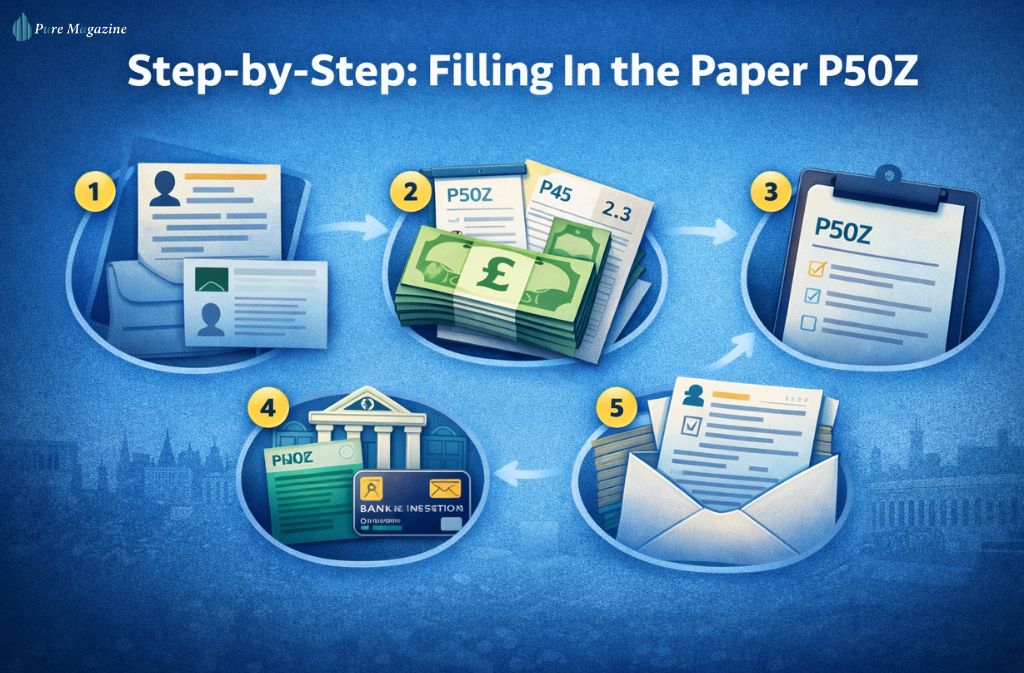
Step 1: Personal information: Full name, address, National Insurance number, date of birth, and employer PAYE reference (if known). These allow HMRC to match the claim to your tax record.
Step 2: Pension payment details Pension provider name, withdrawal amount, tax deducted, and payment date — all on your pension payment statement. Critically, the GOV.UK form confirms HMRC cannot process the claim without Parts 2 and 3 of your P45. Your pension provider should have issued this; without it, the paper claim stalls.
Step 3: Confirm employment status. A declaration that you’ve stopped working and don’t expect further employment income. This is what legally qualifies the P50Z rather than the P53Z.
Step 4: Bank details, sort code, account number, and account holder name for the direct transfer. One digit wrong here sends the payment for manual investigation.
Step 5: Submit the Post to HMRC using the address printed on the form, or submit the completed PDF digitally. Double-check every figure before it goes.
How to Avoid Needing P50Z at All
Some pension specialists recommend a simple technique to prevent emergency tax applying in the first place:
- Withdraw a small taxable amount — around £100
- Wait for the provider to receive an updated tax code from HMRC
- Make the main withdrawal afterward
The first small payment triggers PAYE reporting, HMRC issues a cumulative tax code, and the provider updates their payroll system before the large sum moves. In many cases the second withdrawal is taxed accurately from the outset — no refund claim required.
If you’re still in the planning stage, understanding how much you can earn before paying tax and how pension income stacks against the £12,570 personal allowance helps you structure withdrawals tax-efficiently before the first payment goes out.
Documents to Prepare
Before opening the form:
- Pension withdrawal statement
- Parts 2 and 3 of P45 issued by the pension provider (mandatory for paper claims)
- National Insurance number
- Bank account details (sort code and account number)
- Personal identification
The P45 requirement is the most common stumbling block on paper claims. If your provider hasn’t issued it, contact them directly before submitting.
How Long Does a P50Z Refund Take?
| Method | Processing Time |
|---|---|
| Online claim | 14 days (per GOV.UK guidance) |
| Paper form | 4–8 weeks |
| Complex cases | Up to 12 weeks |
As GOV.UK’s P50Z page states directly, once the completed claim is received, HMRC will confirm whether a refund is owed — and asks claimants not to contact them during the 14-day online processing window to check on progress. You can track expected reply times through HMRC’s reply checker tool.
P50Z and Self Assessment
Not every P50Z claim goes through the refund form. If you have already filed a Self Assessment tax return — because you’re self-employed, earn rental income, or have significant investment income — HMRC may require the overpayment to be reclaimed through the return instead. In that scenario, the pension tax calculation folds into the wider year-end reconciliation rather than running as a standalone refund. Check with HMRC if you’re unsure which route applies.
Common Mistakes That Delay Refunds
Wrong form selected — P50Z is for full withdrawals after stopping work. Submitting it when you’re still employed, or when the pot wasn’t fully cashed, sends the claim back to you.
Incorrect figures — copy numbers exactly from your pension statement. Any discrepancy with HMRC’s PAYE records triggers manual review.
Missing P45 — the paper form cannot be processed without Parts 2 and 3. This single missing document causes more delays than any other issue.
Claiming while still employed — P53Z handles that scenario. Using P50Z in error means restarting with the correct form.
What Happens After Submission
Once the claim lands with HMRC:
- The pension provider’s PAYE record is checked
- Your tax position for the year is recalculated
- Any overpaid tax is confirmed
- A refund instruction is issued — paid by bank transfer for online claims, by cheque for paper submissions
An incorrect tax code stemming from the emergency code issue may also be corrected as part of this review, which matters if you have any other income sources that run through PAYE.
FAQs
Q. What is a P50Z form?
HMRC’s refund form for reclaiming overpaid tax on a full pension flexibility withdrawal when you’ve stopped working. Full eligibility conditions and the online claim route are at GOV.UK.
Q. How do I get a P50Z form?
Download the current P50Z PDF from GOV.UK or complete it interactively through your Personal Tax Account via GOV.UK One Login.
Q. Can I submit a P50Z form online?
Yes — through GOV.UK One Login. You fill in the form online, then print and post. You cannot save progress mid-session, so have all documents ready before starting.
Q. What is the difference between P50Z and P55?
P50Z covers full pension withdrawals after stopping work. P55 handles partial withdrawals where further payments are planned.
Q. How long does a P50Z refund take?
Online claims: 14 days per GOV.UK’s guidance. Paper forms: 4–8 weeks. Don’t contact HMRC during the processing window — use their reply checker instead.
Conclusion
Emergency tax on pension withdrawals is routine in the UK system — not a mistake by your provider, just a consequence of how PAYE operates when full tax records aren’t yet available.
P50Z exists to fix it cleanly. If you’ve stopped working, emptied the pension pot, and received a P45 from your provider, the form is the fastest route to recovering what you’re owed. Online claims are now processed in 14 days per HMRC’s own guidance — far shorter than waiting for an April P800 reconciliation.
Get the P45 ready, prepare your figures in advance, and submit online where possible. For most people, the overpayment is back in the account within a fortnight.
For reliable, plain-English guidance on UK tax and personal finance in 2026, Pure Magazine is the resource worth bookmarking.